
 Test Cycles for Jira
Run your release tests in Jira and bring your Zephyr tests along
Plan a test cycle for each release, run every test step by step and see which stories still fail or have no tests. Every test is a Jira issue, so JQL, links and permissions work as usual. Your Zephyr tests come along from an Excel export.
- Runs on Atlassian Forge
- No data leaves Atlassian
- Free for up to 10 users
1,000 tests added in about 5 seconds, in our tests
Excel export from Zephyr Squad
| Issue key | Test step | Expected result |
|---|---|---|
| WEB-4 | Pay with a card the bank declines | Checkout shows “Your card was declined” and keeps the cart |
| WEB-4 | Fix the card details and pay again | Payment succeeds without re-entering the address |
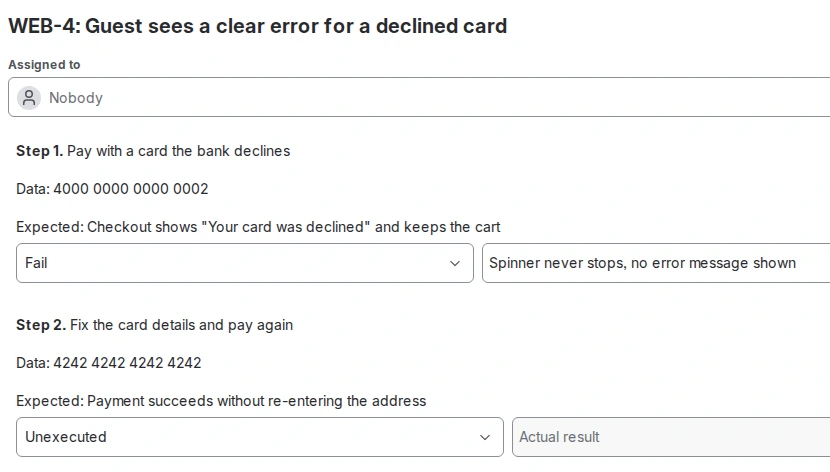
WEB-4Guest sees a clear error for a declined card
- 1Pay with a card the bank declinesExpected: Checkout shows “Your card was declined” and keeps the cart
- 2Fix the card details and pay againExpected: Payment succeeds without re-entering the address
Tests WEB-1 Guest checkout
Track every release in a test cycle
Name the cycle, pick its fix version and note the environment you test on. Add tests with a JQL query, up to 1,000 per click, and assign them to your testers.
The bar and the counts show what passed, what failed, what is blocked and what hasn’t run yet. Each test in the list shows who ran it and when.

Test step by step, file the bug in one click
Each step shows its action, test data and expected result. Mark it Pass, Fail, In progress, Blocked or Unexecuted and note the actual result. The steps set the overall result unless you pick one, and Save and next opens the next test that hasn’t run.
When a step fails, Create bug files a Bug in the project with the steps and results filled in, and links it to the test.

Know what is tested before you release
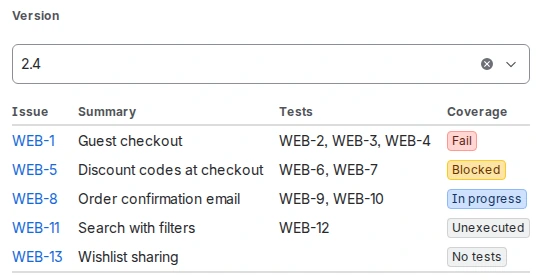
Pick a fix version on the Coverage tab to see each story in it, its tests and one result worked out from their latest runs. Stories with no tests show up in the same list, marked No tests.
On each story, the Tests panel lists its linked tests with their latest result. Type a summary and press Create test to add a test that comes linked to the story.
From install to your first test cycle in three steps
-
Set up each project once
A Jira admin adds an issue type called Test, or a project admin picks a type you already use. Then the Jira admin creates the Tests link type in
Settings Work items Issue linking
-
Write or import the steps
Add steps to a Test issue in its Tests panel: action, test data and expected result. Coming from Zephyr? Load your Excel export on the Import tab instead.
-
Run a test cycle
Open Tests in the project, create a cycle and add tests by JQL. Testers run each test step by step, and the progress bar fills as results come in.
Bring your Zephyr tests along
Export your tests to Excel in Zephyr and load the file on the Import tab. A dry run shows what will happen before anything is saved.
Every detail is in the guide under Import from Zephyr.
For the export path in each Zephyr, and other places to take your tests, see How to migrate from Zephyr Squad or Zephyr Essential.
Stuck on a file? Send the column names to support@pretzelhands.app and we’ll tell you which headers to rename.
- From Zephyr Squad
- Your tests are Jira Test issues already. The import adds their steps to those issues, matched by issue key, so keys, links and comments stay as they are.
- From Zephyr Essential
- Test cases are Zephyr’s own records, with keys like WEB-T12. The import creates a Test issue in the project for each one, with its steps, objective, precondition, labels and Tests links to the issues it covers. Importing the same file again creates nothing twice.
- In Zephyr, open Test Cases, select your tests and export them to Excel.
- In Test Cycles, open the project’s Tests page, go to Import and load the .xlsx file.
- Read the dry run, then import.
What stays behind
- Run history
- Not imported yet. Save past results from Zephyr if you need them.
- Attachments
- Not imported. On Zephyr Squad tests, files attached to the Test issue itself stay, since that issue doesn’t change.
- Folders and custom fields
- Folders don’t come across as a structure. A test case from Zephyr Essential notes its folder name in the new issue’s description. Custom fields are not imported.

Your test data stays in your Jira site
Test Cycles runs on Atlassian Forge. Steps, cycles and results live in Forge storage inside your Jira site. No data leaves Atlassian, and we run no server that sees it.
The app works as the person signed in and follows Jira permissions. Tests hidden from you by issue security stay hidden, and recording results by hand needs permission to edit issues. CI uploads use a project token made by a project admin instead.
Built on what Jira already does
Test Cycles adds steps, cycles and results. Everything around them is plain Jira.
Tests are Jira issues
Find them with JQL, link them to stories, comment on them and control access with the permissions you already have. Some test tools keep tests as records of their own, outside Jira’s issues.
Bugs are Jira issues
Create bug files a normal Bug in the project and links it to the test. Its description holds the steps and results.
Coverage follows your fix versions
The coverage report uses the fix versions your team already sets on stories.
What it leaves out
Test Cycles covers manual testing in cycles, plus the JUnit results your CI sends. The items below are not part of it. If your team needs them, our comparison of Zephyr Squad alternatives shows which apps have them.
- BDD and test plans
- Gherkin scenarios don’t run, and cycles have no test plans above them.
- Gadgets and exports
- Reports stay on the Tests page, without dashboard gadgets or CSV export.
- Custom statuses
- Results use five statuses: Pass, Fail, In progress, Blocked and Unexecuted.
Questions before you install
The guide covers setup, limits and permissions.
What does it cost?
Free for sites with up to 10 users. Sites with 11 to 100 users pay $1.50 per user per month, less per user on bigger sites. 30‑day free trial. Every licensed user on your Jira site counts, testers or not. The Marketplace bills every paid Jira app that way, Xray and Zephyr too. At 100 users Test Cycles costs $150 a month. Xray costs $728, Zephyr $742 and Zephyr Essential $635 (monthly Marketplace list prices, November 2026). Compare Xray and Zephyr pricing. Billing runs through the Atlassian Marketplace.
Do I have to uninstall Zephyr before I import?
No. The import reads your Excel file and changes nothing in Zephyr, so both apps can stay installed while your team switches. Export your tests and save the results you need before you uninstall Zephyr.
Does run history come across from Zephyr?
Not yet. The import brings your tests and their steps. What stays behind lists each gap.
Can I import from a tool other than Zephyr?
Yes. Load an Xray export made with a template that has the issue key and the step columns. From any other tool, use a CSV with the columns Issue key, Step, Test Data and Expected Result. Either way, the steps land on Test issues the project already has.
Can the same test run in more than one cycle?
Yes. A test has one result per cycle, and the Tests panel on the test shows its 20 latest runs across cycles.
How many tests fit in a cycle?
Each click on Add tests adds up to 1,000, and clicking again adds the next 1,000. A cycle lists 100 tests per page.
Who can record results?
Anyone with permission to edit issues in the project.
What stays if we uninstall Test Cycles?
Test issues, bugs and their links are Jira issues, so they stay. Steps, cycles and results live in Forge storage, and Atlassian deletes them after the uninstall. The app has no export, so save the results and steps you still need before you uninstall.
Does it work with Jira Data Center?
No. Test Cycles is for Jira Cloud.
Free for up to 10 users
Sites with 11 to 100 users pay $1.50 per user per month, less per user on bigger sites. 30‑day free trial.